Upshot Engine
For governmentLet’s talk

Upshot products / Company Brain

Your company knows it.
Help everyone find it.

Help employees find a current procedure, reuse previous work and understand a decision without searching across systems or waiting for a colleague. We connect the agreed sources, test the answers and train your team.

Discuss a pilot Try the sample workflow

Configured for your organization. Scoped, tested and rolled out with your team.

Company BrainExample
Documents
Emails
Meetings

Which client handover process should I follow?

An answer with context

Start with the current checklist.

Use version 3. Review open requests and account records with the incoming owner.

Client handover · v3
Additional approval? Confirm with the operations lead.
Inspect the sample sources

I’m taking over a client account. Which handover process should I follow?

  1. The approved procedure

    The client handover checklist, version 3, covers open requests, account records and a review with the incoming owner. It replaces version 2.

    Operations / Client handover · v3 · Sep 1
  2. The person responsible

    The operations lead owns the checklist. The outgoing account lead and incoming owner review the completed handover together.

    Operations / Client handover · Responsibilities
  3. One point to confirm

    These sources do not state whether this account needs an additional approval. Ask the operations lead before completing the transfer.

    Operations / Client handover · Exceptions
Fictional example · Your workflow and interface are scoped with your team.

For knowledge-intensive teams in financial services, professional services and government: client-service staff, operations, project teams, managers and new joiners.

Recognizable work. Useful answers.

Everyday use cases.

01Employees & client-service teams

Find the current procedure

Get to a usable answer with less searching and fewer interruptions to the people who know the process.

Example & success measures
“Which process applies, and who owns it?”
The output
An answer with its source, version, owner and any unresolved questions.
What we measure
Time to an accepted answer, source correctness and successful task completion.

02Advisors, analysts & project teams

Reuse previous work

Find relevant work and lessons with enough context to judge whether they apply to the task in front of you.

Example & success measures
“Have we solved this before?”
The output
A short list of relevant examples, approved templates and the people behind them.
What we measure
Search and preparation effort, relevance and corrections needed before reuse.

03New joiners & team managers

Get up to speed

Give a new colleague a useful starting point without asking several people to reconstruct the same history.

Example & success measures
“What should I know before Monday?”
The output
An onboarding brief with key decisions, useful reading and responsible contacts.
What we measure
Time to complete the first task, missing context and help needed from colleagues.

04Operations & delivery leads

Understand a decision

Recover the recorded reasoning before repeating a discussion or reopening a settled decision.

Example & success measures
“Why did we choose this approach?”
The output
A source-linked decision summary that distinguishes recorded facts from gaps.
What we measure
Review time, evidence completeness and unresolved questions requiring escalation.

Already have AI tools?

What Upshot takes on.

A well-configured platform may already meet your needs. We scope the integration, evaluation and employee support around it.

See how the two approaches connect your data

A platform your team configures

GPT, Claude, Copilot + tools

Five work sources connect directly to an AI assistant, which produces a response.
Connect sources → Ask the assistant → Review

Configured & supported by Upshot

Company Brain

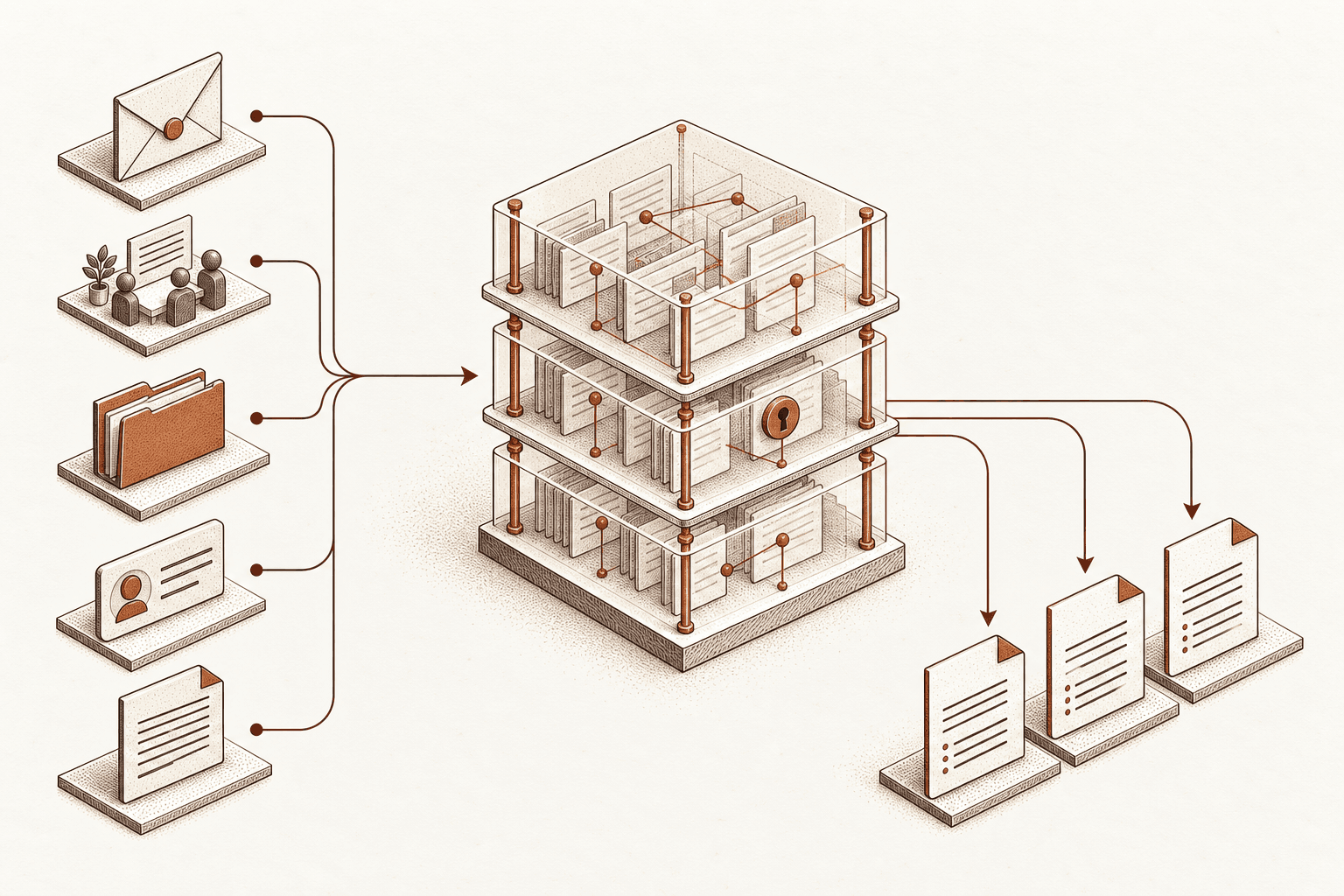
Work sources feed a shared structure of linked records with access controls, then produce consistent briefing formats.
Unify context → Apply agreed rules → Support the team

Business context

GPT / Claude / Copilot + tools

Your team configures source connections and resolves conflicting records.

With Upshot

We link clients, projects and people, with agreed rules for conflicts.

Everyday workflows

GPT / Claude / Copilot + tools

Your team selects tasks and configures the platform’s workflow features.

With Upshot

We build and test briefs, handovers and searches around your work.

Data upkeep

GPT / Claude / Copilot + tools

Your team owns source quality and access changes; connector support varies.

With Upshot

We agree connection upkeep, freshness checks and a support owner.

Quality & response time

GPT / Claude / Copilot + tools

Your team sets acceptance criteria and evaluates the configured experience.

With Upshot

We test real tasks, answer consistency and response time against agreed targets.

Employee adoption

GPT / Claude / Copilot + tools

Your team organizes onboarding, training and support.

With Upshot

We onboard employees, run workshops and improve workflows with their feedback.

Example: linking records across your systems

“Acme Ltd” in the CRM, “Acme renewal” in Outlook and “Project Atlas” in meeting notes can refer to the same engagement. We agree how to link them, preserve source permissions and flag uncertain matches.

Start with the context you already have

Connected sources.

Begin with one team, one recurring task and an agreed collection of information. Define which sources are authoritative, how old or conflicting records are handled, and what each role is allowed to see. Then evaluate answers against examples your team knows well.

  • Outlook or other work email
  • Teams meeting notes and transcripts
  • SharePoint and document libraries
  • Internal procedures, templates and CRM knowledge

Connections are agreed during discovery, based on available APIs, access controls and your data requirements.

Enterprise requirements, from the start

Security & access.

We define your security requirements before connecting company information, then verify the agreed controls before rollout.

Review security & delivery
The right access
Map employee identity, source permissions and client boundaries. Test that restricted information stays restricted.
Answers with evidence
Design source references and review steps so employees can check an answer before relying on it.
Clear data handling
Review encryption, data isolation, provider terms, retention, deletion and audit requirements for your deployment.

A product is only useful when people use it

Employee onboarding.

We help employees get started with their own work: role-specific onboarding, practical exercises, checking sources and knowing when to ask a person.

In a pilot, compare time to an accepted answer against the current workflow, including checking and correction. Track repeat use and expert interruptions alongside source quality, so the evaluation reflects the employee’s total effort.

Explore AI enablement

Start with one team and one useful question

Plan your first workflow.

We’ll work through the sources, security requirements and a practical first pilot.

Plan your first use case